
How Can I Advertise on Instagram: A Practical Guide for Business
Learn how to advertise on Instagram through Meta Ads Manager: objectives, audiences, placements, budgets, costs, and a setup flow you can follow today.
ADS Beast editorial teamPublished 12 min read
You advertise on Instagram through Meta Ads Manager, the same tool that runs Facebook ads. Link your Instagram account to a Facebook Page, choose an objective, define your audience, upload creative, and set a budget. Ads run in the feed, Stories, Reels, and Explore.
In short:
- Instagram ads are bought inside Meta Ads Manager, not from the Instagram app.
- You need a Facebook Page connected to your Instagram account before you can launch.
- Campaign objectives decide where your ad shows and what Meta optimizes for.
- You can start with a small daily budget and cap total spending at any time.
- Cost depends on audience, industry, season, and ad quality, not on a fixed price list.
What do you need before you can advertise on Instagram?
You need three things in place before your first campaign: a Facebook Page, an Instagram account, and access to Meta Ads Manager. The Instagram account must be a professional account (Business or Creator) and connected to that Page. Once connected, Instagram appears as a placement option inside every campaign you build.
The connection matters because Meta treats the two platforms as one ad system. Your Page owns the ad account, your Instagram profile supplies the identity the ad appears under, and Ads Manager handles targeting, budgets, and reporting for both. If you skip the connection step, Instagram placements stay greyed out.
Two practical notes from working with small accounts. First, set up two-factor authentication on the Facebook account that owns the ad account before you spend anything, because locked accounts are the most common reason a campaign stops mid-flight. Second, decide who on your team gets admin access now. Adding people later is easy; recovering an account from a former employee is not.
If you already run Facebook campaigns, the setup will feel familiar. The mechanics are the same, and the guide to how to set up an ad on Facebook step by step walks through the account structure that Instagram campaigns inherit.
How do you advertise on Instagram step by step?
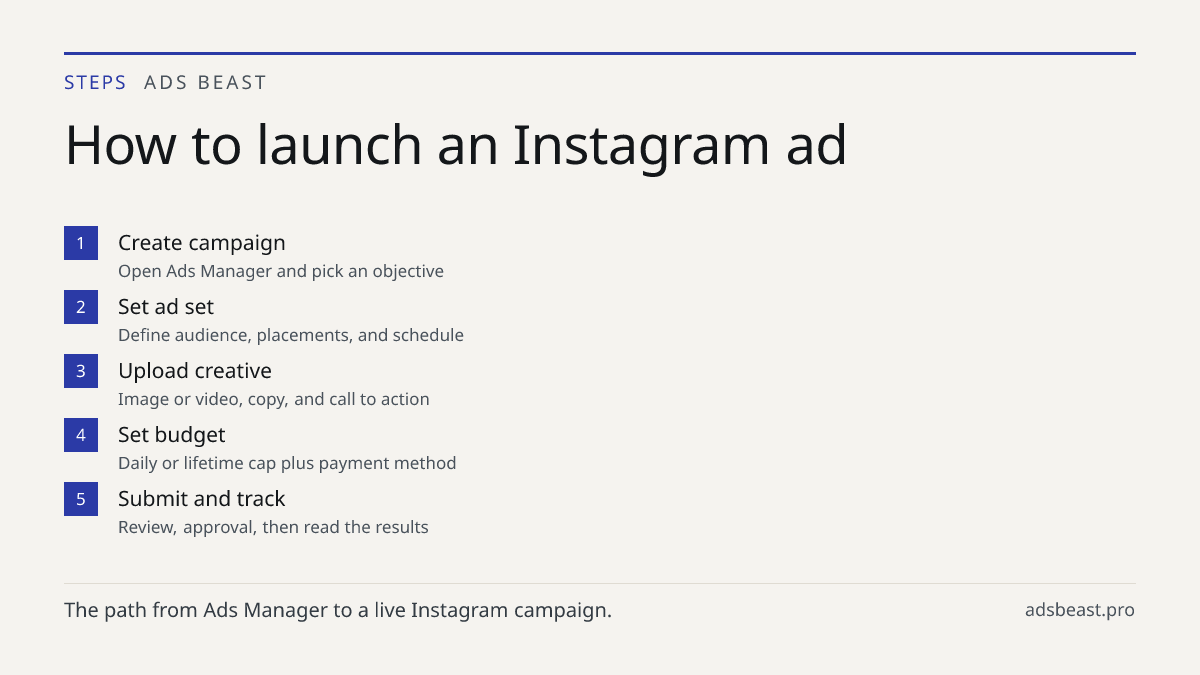
You advertise by creating a campaign in Ads Manager, choosing an objective, defining an audience, uploading creative, and setting a budget. Each step narrows what Meta will do with your money. Here is the sequence most businesses follow.
- Open Meta Ads Manager and click Create. Choose a campaign objective: awareness, traffic, engagement, leads, app promotion, or sales.
- Name the campaign and, at the ad set level, set the conversion event you care about, such as a purchase, a lead form submission, or a link click.
- Define your audience by location, age, gender, interests, and behavior. Save it if you plan to reuse it.
- Choose placements. Select Instagram feed, Stories, Reels, and Explore, or leave placements automatic and let Meta distribute the budget.
- Upload your creative: image or video, primary text, headline, and a call to action button.
- Set a daily or lifetime budget and a schedule. Confirm the payment method.
- Submit for review. Once approved, the ad starts delivering and you can watch results in the reporting tab.
The order matters less than the logic behind it. Objective tells Meta what a "win" looks like. Audience tells it who to show the ad to. Creative decides whether anyone stops scrolling. Budget sets the ceiling on what you risk while you learn.
A common mistake is changing three of these at once when results disappoint. Change one variable per test cycle, keep the rest fixed, and give each version enough time and spend to produce a readable result. Otherwise you learn nothing and blame the platform.
Which campaign objective should you pick?
Pick the objective that matches the action you want people to take, because Meta optimizes delivery toward that action. If you want sales, choose sales. If you want messages or form fills, choose leads. Choosing awareness when you actually need purchases usually produces cheap impressions and no revenue.
| Objective | Best for | What Meta optimizes for |
|---|---|---|
| Awareness | New brand or product launches | Impressions and reach |
| Traffic | Blog, landing page, or store visits | Link clicks |
| Engagement | Building comments, shares, saves | Interactions with the post |
| Leads | Form fills, messages, sign-ups | Completed lead actions |
| Sales | Ecommerce and direct purchases | Purchases or add-to-carts |
| App promotion | Mobile app installs and activity | Installs and in-app events |
Two rules of thumb. First, the further down the funnel your objective sits, the more budget and data it needs before it performs, because purchases are rarer events than clicks. Second, if you are unsure, run traffic or engagement first to gather signal, then move budget into sales once you know which creative and audience respond.
How do you target the right audience on Instagram?
You target by combining location, demographics, interests, and behaviors, then refining with your own data. Meta's auction rewards relevance, so a tighter, well-defined audience usually beats a broad one for small budgets.
The building blocks:
- Core audiences. Location, age, gender, language, interests, and behaviors. Good for reaching people who have never heard of you.
- Custom audiences. Your customer list, website visitors, or people who engaged with your Instagram profile or ads. Good for retargeting.
- Lookalike audiences. Meta builds these from a custom audience to find similar people. Useful once you have a few hundred customers or visitors to seed from.
For a local business, start with a radius around your location and a tight age range. For an online store, start with interest and behavior targeting that matches your product category, then layer in retargeting once you have traffic. Retargeting almost always converts better than cold traffic because the audience already knows you, so keep a slice of budget for it.
Where do Instagram ads actually appear?
Instagram ads appear in four main places: the feed, Stories, Reels, and Explore. Each placement has a different format and a different mindset behind it, so the same creative rarely works everywhere.
Feed ads sit between posts and allow the most text and a clear call to action. Stories are full-screen, vertical, and short-lived, so they reward simple visuals and one message. Reels ads run inside short video, and they perform when the ad looks like the content around it rather than an interruption. Explore ads reach people browsing for new accounts and ideas, which suits discovery-driven products.
You can select placements manually or leave them automatic. Automatic placement stretches the budget across whatever is cheapest and most likely to hit your objective, which is usually the better starting point for a small budget. Manual placement makes sense when you know from your own data that one surface outperforms the others.
Creative is where most campaigns are won or lost. Vertical video, readable text, and a clear first frame matter more than polish. The Instagram ad creatives and posts guide covers formats and copy in detail.
How much does it cost to advertise on Instagram?
There is no fixed price. Cost depends on your audience size and competition, your industry, the season, your objective, and your ad quality. Meta runs an auction, so you bid against other advertisers for each impression, and the price moves with demand.
That said, the shape of the numbers is predictable. Most small businesses spend somewhere between $5 and $50 per day, with an average CPM in the US in the $8 to $15 range. Cost per click typically lands between $0.50 and $1.50 depending on niche and targeting. These are ranges, not promises, and your results will sit somewhere inside or outside them depending on how competitive your category is.
What drives the number up or down:
- Audience competition. Crowded niches cost more per impression.
- Season. Retail peaks around holidays and sales events.
- Ad quality and relevance. Meta charges less for ads people engage with.
- Objective. Awareness is usually cheaper per impression than sales.
- Placement. Reels and Stories can be cheaper than feed depending on the moment.
You control the ceiling, not the exact price. A daily budget caps what you spend in a day, and a lifetime budget caps the whole campaign. If you want to compare the mechanics against the other side of the same ad system, the breakdown of Facebook ad costs and budgets applies to Instagram placements too, since both run through one auction.
How do you buy an ad on Instagram and get it approved?
You buy an ad by creating it in Ads Manager, entering payment details, and submitting it for review. Open Ads Manager, click Create, build the campaign as described above, then enter a daily or lifetime budget and add a payment method. Submit the ad, and Meta reviews it.
Approval usually takes under 24 hours. Billing only starts once the ad is live, so a rejected or paused ad costs nothing. Rejections most often come from text-heavy images, prohibited products, unrealistic claims, or landing pages that do not match the ad. If you get rejected, fix the specific issue, resubmit, and expect a faster review the second time.
If you would rather not build the campaign by hand, an AI campaign setup tool that handles Instagram advertising can assemble the objective, audience, and creative structure for you, which shortens the path from idea to live ad.
Should you advertise on Instagram, Facebook, or both?
Run both, because they share one ad system and one budget. When you advertise on Instagram and Facebook together, Meta distributes your spend across whichever platform is more likely to hit your objective for each person. You do not pay twice for the same system.
The practical difference is audience and format. Instagram skews toward visual, discovery-driven products and younger audiences. Facebook tends to perform better for certain service businesses and older demographics. If your budget is small, letting Meta choose between them is usually more efficient than splitting campaigns manually.
For agencies and teams managing multiple accounts, the choice between managing Facebook ads through an agency or an AI platform applies to Instagram as well, since both sit inside the same Ads Manager structure. If you are starting from zero, the walkthrough on how to create a Facebook ad from scratch gives you the account skeleton that Instagram campaigns plug into.
Common mistakes that waste budget
Most wasted spend comes from a short list of avoidable errors. Knowing them in advance saves more money than any optimization trick.
- Changing everything at once. You cannot tell what worked. Change one variable per test.
- Judging too early. A campaign needs enough impressions and conversions before the data means anything.
- Sending traffic to a weak landing page. The ad can be great and still fail if the page does not match the promise.
- Ignoring retargeting. Cold audiences cost more; people who already engaged convert cheaper.
- Running one creative forever. Creative fatigue sets in, and frequency climbs while results drop.
- No conversion tracking. Without it, Meta cannot optimize for purchases and you cannot measure return.
What to do next
Start with one campaign, one objective, and one audience. Set a daily budget you are comfortable losing while you learn, connect your Instagram account to your Facebook Page, and launch. Then read the results after enough spend to be meaningful, not after one day.
The fastest way to get from setup to a live campaign is to let the platform build the structure for you. You can advertise on Instagram with an AI campaign setup that handles objective, audience, and creative placement, then adjust from there.
FAQ
How can I advertise on Instagram? You advertise through Meta Ads Manager, the same tool that runs Facebook ads. Connect your Instagram account to a Facebook Page, pick an objective such as traffic, sales, or leads, and set a budget. Ads appear in the feed, Stories, Reels, and Explore, and you can start with as little as $1 per day.
How do you advertise on Instagram? Choose an objective, define your audience by location, age, interests, and behavior, then upload creative and set a budget. Instagram uses the same auction as Facebook, so you bid against other advertisers for each impression. A typical cost per click lands between $0.50 and $1.50 depending on niche and targeting.
How do I buy an ad on Instagram? Open Meta Ads Manager, click Create, and select Instagram as your placement. Enter a daily or lifetime budget, add payment details, and submit the ad for review. Approval usually takes under 24 hours, and billing only starts once the ad is live.
How much does it cost to advertise on Instagram? There is no fixed price because costs depend on your audience, industry, and ad quality. Most small businesses spend between $5 and $50 per day, with an average CPM of $8 to $15 in the US. You can cap spending with a daily budget so you never pay more than you set.
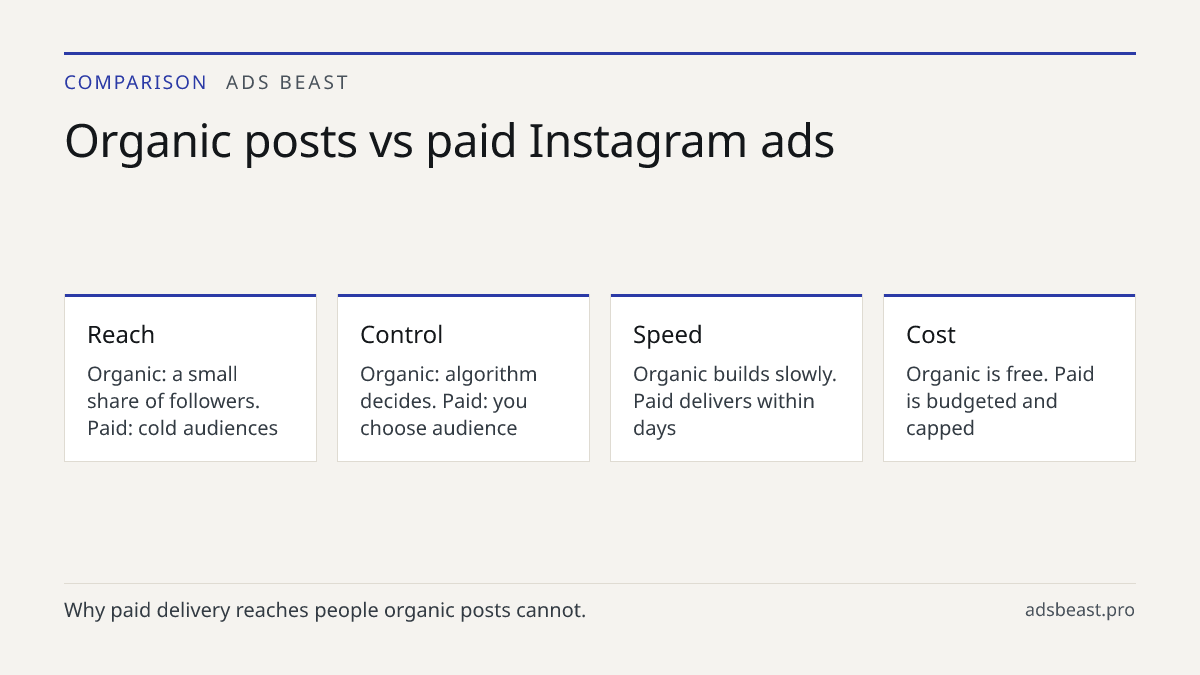
Why should a business advertise on Instagram instead of just posting organically? Organic reach has dropped for most accounts, so only a small share of followers see a typical post. Paid ads let you target people who have never heard of you and control who sees your message. For product launches or seasonal sales, ads usually deliver faster results than posting alone.
Do I need a Facebook account to advertise on Instagram? Yes. Instagram ads run through Meta Ads Manager, which requires a Facebook account and a Facebook Page linked to your Instagram professional account. Without that connection, Instagram placements are not available in the campaign builder.